




Turn your expert eye into
actionable UX reports

Capture usability issues as you browse, back them with heuristic criteria, and share a polished report.
Built for UX audits, expert reviews, heuristic evaluations, and accessibility assessments.

Try it for free

Trusted by teams around the globe

Actual interface review process

Reviewing interfaces is
time consuming!

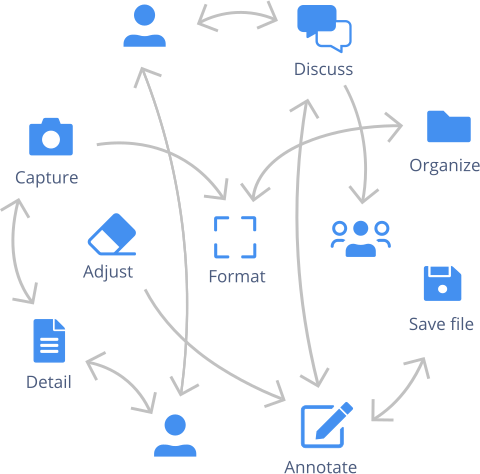
Every day, your team juggles different tools to take screenshots, detail recommendations, and share them with colleagues in different departments. Bouncing from one platform to another often leads to lengthy and confusing email threads, which is far from optimal! Not to mention, it results in unnecessary meetings and impacts project delivery.

In fact, most teams spend over 50% of their time redoing work that’s already been done. It’s no wonder 60% are affected by project delays and budget overruns!
Streamlined interface review process with Capian

Use Capian as a team to improve
interfaces with ease and speed

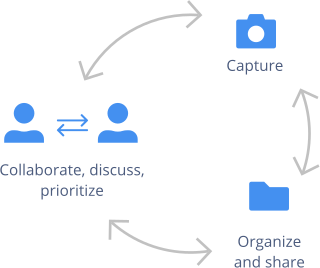
Capian empowers teams to review and improve project interfaces quickly by providing them with a collaborative workspace where they can share relevant feedback, prioritize better, and make better product decisions.

Focus on your expertise, capture your observations
and share them with your team without the hassle!

UX reviews

  • Use the ergonomic criteria to categorize your findings and make your team aware of UX best practices.
  • Focus on your expertise and save time doing reviews.
  • Perfect for UX designers and customer experience specialists.

Accessibility

  • Evaluate interfaces against WCAG and RGAA criteria to identify barriers that automated scanners miss.
  • Document compliance issues with screenshots, annotations, and built-in criteria references.
  • Perfect for accessibility consultants, compliance teams, and agencies.

Product reviews

  • Identify tweaks and improvements for your development team and share them in one tool.
  • Cut down on meetings and let your development teams focus.
  • Perfect for designers, product managers and developers.

Benchmark

  • Identify your competitors' strengths and weaknesses and compare them with custom grids.
  • Capture inspiration and annotate sites while browsing to centralize everything in one tool.
  • Perfect for product managers, UX designers and marketing and content teams.

Content

  • Capture the improvements you need to make on your sites to better convert your visitors into customers.
  • Suggest improved copy and calls to action to your team.
  • Perfect for marketing, copywriters and UX writers.

Documentation

  • Document business interfaces and processes and decrease the learning curve.
  • Create always up-to-date and centralized documentation.
  • Perfect for designers, product managers and your customer support team.

Average customer gains

70%

Time saved during the interface review process — from capture and annotation to discussion and prioritization of improvements. Quit the juggling act and focus on the project itself.

2x

Fewer review-related email threads cluttering your inbox. Emails are not designed to track document suggestions. Say goodbye to confusing email trails and welcome clarity!

40%

Fewer meetings thanks to the collaborative workspace and prioritization process. Communicate with your team directly in the document itself. Put unnecessary meetings on hold and make way for focus time!
Streamline your interface review process

Interface review streamlined with Capian Chrome Extension and mobile app

More time and more focus

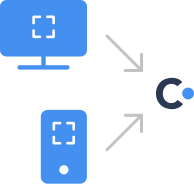
Use the Chrome extension and mobile app to save screenshots and make annotations while you browse. Organize your recommendations and let Capian create your report. Less bouncing around, more time to focus.
Interface review team collaboration streamlined with Capian

Team discussions made easy

Discuss improvements with your team directly in Capian. Forget those messy email threads and confusing document versions.

Built for evaluation experts

For UX Professionals

Capian is an all-in-one UX review tool for user experience professionals. Great for expert reviews, UX/UI audits, and much more.

Learn more

For Product Managers

Organize interface feedback, align your team on priorities, and track improvements across sprints. Ideal for Sprint Reviews.

Learn more

For Accessibility Experts

Evaluate against WCAG 2.2 and RGAA 4.1 with built-in criteria. Capture what automated scanners miss and deliver compliance reports your team can act on.

Learn more

A tool that’s completely unique

Created by UX professionals

Designed by an experienced UX team to address the interface improvement issues encountered by real teams working to solve real problems.

For the entire team

Designed with collaborative end-users in mind, Capian is simple enough for everyone to use, regardless of their expertise (UX, product, design, marketing, development, and management).

Recognized worldwide

Developed by a team of renowned UX professionals, Capian is taught in several schools, training centers, universities, and cited in multiple books.

Support from real people

Online, by phone or email, our team is readily available to help make your project a success. Plus, we speak English and French. Hello! Bonjour!

Always available

Just tell us what you need! Our Customer Success team is always listening and ready to help you unlock your full potential.

Export to your other tools

Send the prioritized improvements to your team task manager with our integrations for Jira, GitHub or GitLab.

How professionals use Capian

Uber

Uber

UX review

Mobile app and website

Industrielle Alliance

Industrielle Alliance

Web properties review

Multiple B2C websites

SFR

SFR

Interface review

B2C web portal

What professionals are saying

I am absolutely delighted by Capian. It's a very easy tool to screen capture and classify bugs and issues according to predetermined criteria or your own. Plus, the report function makes it easy to export a pdf to stakeholders.

Catherine Roy, Freelance UX designer

<strong>Catherine Roy</strong>, Freelance UX designer

I'm really happy with @capianapp! I've saved hours of work on the UX reviews I've done with the tool. Good job!

Alain Robillard-Bastien, UX Expert - Ergoweb

<strong>Alain Robillard-Bastien</strong>, UX Expert - Ergoweb

Frequently asked questions

What is a UX audit?
A UX audit is a systematic evaluation of a digital interface — website, app, or software — to identify usability issues and areas for improvement. It combines expert judgment with established criteria to produce actionable recommendations. Learn more about UX audits.
What is a heuristic evaluation?
A heuristic evaluation is a usability inspection method where experts review an interface against a set of recognized principles (heuristics). Common frameworks include Nielsen's 10 usability heuristics, Bastien & Scapin's ergonomic criteria, and Shneiderman's eight golden rules. Learn more about heuristic evaluations.
What criteria does Capian support?
Capian includes built-in support for the most widely used evaluation frameworks: Nielsen's usability heuristics, Bastien & Scapin's ergonomic criteria, Shneiderman's golden rules, and more. You can also create your own custom criteria to match your organization's needs.
Can I use Capian for accessibility audits?
Yes. Capian includes built-in WCAG 2.1, WCAG 2.2, and RGAA 4.1 criteria for expert-driven accessibility evaluations that complement automated scanning tools. Document compliance issues, annotate barriers, and share prioritized findings with your development team. Learn more about accessibility evaluations.
How does Capian compare to using spreadsheets or slide decks?
Spreadsheets and slide decks require you to juggle screenshots, annotations, formatting, and file sharing across multiple tools. Capian captures everything in one flow: screenshot, annotate, justify with criteria, and the report builds itself. No manual assembly, no version conflicts, no formatting headaches.

Ready to streamline your interface review process?

Try Capian for free